Generally we see 2 common warning raise when we compile the AL App.
<pre class="EnlighterJSRAW" data-enlighter-language="generic">warning AL0604: Use of implicit 'with' will be removed in the future
AL0606: "The 'with' statement is deprecated and will be removed for cloud development in a future release. This warning will become an error in a future release."</pre>
<strong><span style="color: #3366ff;">1st warning <a style="color: #3366ff;" href="https://learn.microsoft.com/en-us/dynamics365/business-central/dev-itpro/developer/diagnostics/diagnostic-al604" target="_blank" rel="noopener">AL0604</a></span></strong>
<strong><span style="color: #3366ff;">2nd warning <a style="color: #3366ff;" href="https://learn.microsoft.com/en-us/dynamics365/business-central/dev-itpro/developer/diagnostics/diagnostic-al606" target="_blank" rel="noopener">AL0606</a></span></strong>
I am sure most of the developer faced above those warnings
Now the question is can we ignore those? Answer is <strong>YES</strong>
Just add <strong>suppressWarnings</strong> property in <strong>app.json </strong>file and you will find there are the warning which can be used here so that it does not raise any warning any more.
<em>Read the official document from here: </em><span style="color: #0000ff;"><strong><a style="color: #0000ff;" href="https://learn.microsoft.com/en-us/dynamics365-release-plan/2020wave2/smb/dynamics365-business-central/suppress-al-warnings" target="_blank" rel="noopener"><em>Read Here</em></a></strong></span>
<img class="alignnone size-full wp-image-372" src="https://www.navwithnav.com/wp-content/uploads/2022/10/2022-10-05_18-46-04.png" alt="" width="249" height="267" />
<div>
<pre class="EnlighterJSRAW" data-enlighter-language="generic">"suppressWarnings": [ "AL0604", "AL0106" ],
"features": ["NoImplicitWith"],</pre>
<div>
<div></div>
</div>
Now from the Business Central 2022 Wave 2 you can use <strong>Implicit and Explicit use of 'With'</strong> which can be switch OFF or ON
</div>
<img class="alignnone size-medium wp-image-373" src="https://www.navwithnav.com/wp-content/uploads/2022/10/2022-10-05_18-54-19-300x91.png" alt="" width="300" height="91" />
You can also use the Pragama for temporary basis not to use this<a href="https://learn.microsoft.com/en-us/dynamics365/business-central/dev-itpro/developer/directives/devenv-directive-pragma-implicitwith" target="_blank" rel="noopener"><strong> Read Here</strong></a>
Back to Series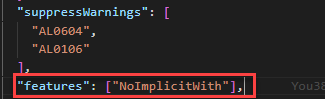
Uncategorized
Can we ignore warning AL0604 and AL0606 when compiling the AL APP?
Generally we see 2 common warning raise when we compile the AL App. <pre class="EnlighterJSRAW" data-enlighter-language="generic">warning AL0604: Use of implicit 'with' will be removed in the future ...
NitinOctober 5, 2022 2 min read
0
0
Discussion (0)
No comments yet. Be the first to share your thoughts!