Today morning I am trying to run the Job queue which was set as per below image.
<img class="alignnone size-full wp-image-383" src="https://www.navwithnav.com/wp-content/uploads/2022/10/2022-10-06_17-00-01.png" alt="" width="590" height="103" />
actually as per client it was failing almost every day, and raising the below error
<pre class="EnlighterJSRAW" data-enlighter-language="yaml" data-enlighter-linenumbers="false">A connection to SQL Server is no longer usable. This could be caused by one of the following reasons: * The server has been shut down manually or because of an error. * The SQL Server connection settings are not correct. * A network failure ...</pre>
Further investigate with the help of Microsoft, we found that two others fields which we have in Job queue should always be mentioned:
<ol>
<li>"<strong>Maximum Number of Attempts to Run</strong>"</li>
<li>"<strong>Rerun Delay (sec.)</strong>"</li>
</ol>
To increase the robustness of these job queue entries, please set their "<strong>Maximum Number of Attempts to Run</strong>" to a feasible number (we use default value of 10 for standard Dataverse synch job queue entries), and give them a meaningful number in "<strong>Rerun Delay (sec.)</strong>" if you haven’t. This number is used like this: if you give n number of retries within one run of the job queue entry, "Rerun Delay (sec.)" determines the interval between those n attempts (this still counts as one job queue entry run).
<img class="alignnone size-full wp-image-384" src="https://www.navwithnav.com/wp-content/uploads/2022/10/2022-10-06_17-04-04.png" alt="" width="647" height="274" />
This way, you give the chance to the job queue entry to try n times with a delay in between, before raising the red flag and setting itself in Error state. This makes the job queue entry robust to transient errors - especially useful if the job queue entry is calling a remote system, like in your case.
These crucial tools for the robustness of a job queue entry are described here:<a href="https://learn.microsoft.com/en-us/dynamics365/business-central/admin-job-queues-schedule-tasks#monitor-status-or-errors-in-the-job-queue:~:text=Job%20queue%20entries%20stop,external%20service%20becomes%20available." target="_blank" rel="noopener">Read here</a>
So next time if you face SQL Server error issue in SaaS version in Job queue please first check if you have entered those field's value.
Thanks.
Back to Series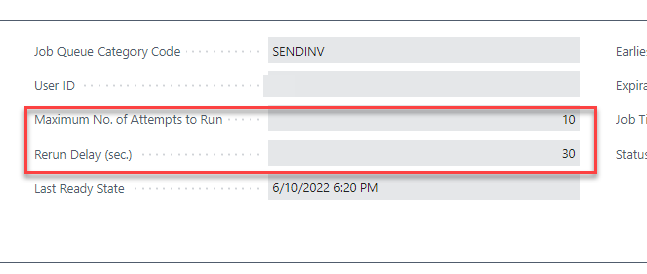
Business Central
Job Queue Error with message "SQL Server is no Longer usable.." in Business Central (SaaS)
Today morning I am trying to run the Job queue which was set as per below image. <img class="alignnone size-full wp-image-383" src="https://www.navwithnav.com/wp-content/uploads/2022/10/2022-10-06_...
NitinOctober 6, 2022 2 min read
0
0
Discussion (0)
No comments yet. Be the first to share your thoughts!