NavWithNav

The premier knowledge-sharing hub for Microsoft Dynamics 365 Business Central developers, architects, and ERP professionals.

Back to Series
Uncategorized

Lets renumber the AL Objects

<h1 style="text-align: center;"><span style="color: #00ffff;">Lets renumber the AL Objects</span></h1> <h2>Its a requirement when we need to upgrade app to another no. series, sometime we require to ...

NitinJanuary 9, 2023 1 min read
BusinessCentralVisualCodeFileContentImageTechnicalMicrosoftDyanmicsnavwithnavCommandsVSCodeRenumberObjects
Lets renumber the AL Objects

Lets renumber the AL Objects

Its a requirement when we need to upgrade app to another no. series, sometime we require to renumber all our objects no. series.

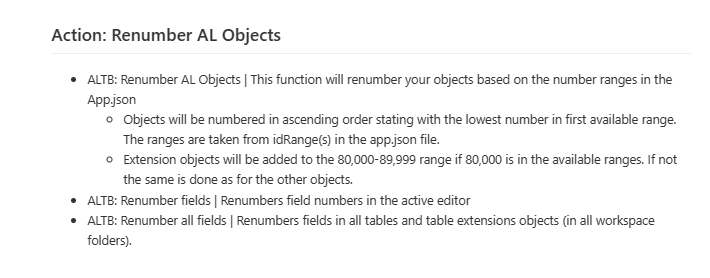
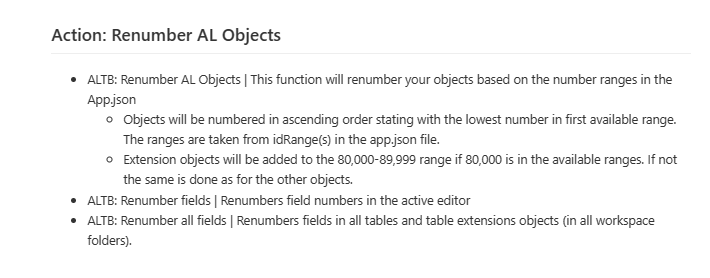
Lets look how we can do that in seconds. First of all we require a app extension to be installed in our visual studio code i.e. AL Tool Box Renumber AL Texts After installing that APP lets start how to use that open your command palate and start finding "ReNumber AL Objects." As mentioned in above Renumber command always seeks your ID ranges which is defined in your APP.json file and starting converting based on this new no. series. go through the below video: [embedyt] https://www.youtube.com/watch?v=0xVPPy3kcmY[/embedyt]      
0
0

Discussion (0)

Leave a comment

No comments yet. Be the first to share your thoughts!