NavWithNav

The premier knowledge-sharing hub for Microsoft Dynamics 365 Business Central developers, architects, and ERP professionals.

Back to Series
Uncategorized

Microsoft Business Central solution for Boolean switch problem in the browser (for Onprem version)

<p style="text-align: center;"><b>Microsoft Dynamics Business Central Boolean Switch problem on Chrome and Edge browser</b></p> <b>Bug?</b> Currently, all Dynamics 365 Business Central SaaS client...

NitinSeptember 23, 2022 2 min read
Microsoft Business Central solution for Boolean switch problem in the browser (for Onprem version)

Microsoft Dynamics Business Central Boolean Switch problem on Chrome and Edge browser

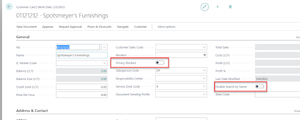
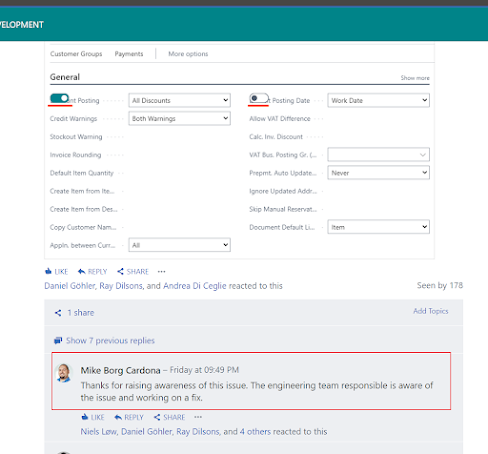
Bug? Currently, all Dynamics 365 Business Central SaaS clients running Booleans or Demos on Chrome and/or Edge browser are finding the browsers are shifting true/false fields in BC over the captions of certain fields. Why its happening? All pages throughout the system with Boolean Fields (true/false) flags have a bug where the Boolean is getting pushed to the top of the fast tab and hiding the caption for other fields as shown below from a customer card example: Can we Fix it? To fix the problem in SaaS version, Microsoft is working already on the issue  
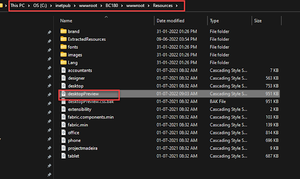
  To solve this problem OnPrem version, there is solution to modify the desktopPreview.CSS file in our InetPub folder as per below Note: BC180 can be your local version folder  
    Now save this file to Desktop and open in Note pad and find the below Tag, and remove the below Yellow Property from the tab Save this file and copy and paste into your original folder. .booleancontrol-toggle-switch-container .edit-container .input-wrapper{display: inline-flex; Now open the browser and check again, issue resolved.  
0
0

Discussion (0)

Leave a comment

No comments yet. Be the first to share your thoughts!